MAGIC Visualized Management and Control Platform
- characteristics
- parameters
- download
1. Supports free operation; simply drag with fingers to put content on screen, realizing window management, splicing, arbitrary zoom, picture-in-picture, screen roaming and other functions for all video signal sources; WYSIWYG and easy to operate.
2. Large-screen windowing supports regular windowing such as 2x2 and 3x3, as well as irregular windowing by freely splitting window layouts via manual dragging;
3. Supports real-time preview of virtual screen and large screen; standard definition, high definition and ultra definition can be selected according to actual needs for convenient viewing of preview pictures;
4. Supports unlimited real-time saving and recalling of plans and scheduled polling at any set time; different scene switching effects and scene names can be defined, with short scene switching response time, ultra-low latency, extremely smooth pictures and instant window operation response; the plan can also be called to screen by voice on Huawei tablets without any device or plugin.
5. Supports LED, DID, LCD and DLP splicing, roaming, dragging, custom splitting and multi-layer overlay display; a single screen supports 16 channels of video display and overlay simultaneously; standard resolution output for seamless splicing;
6. Supports video transmission via RTSP and RTMP protocols and proprietary protocols; audio AAC, G.711, G.726; supports audio/video synchronization and asynchronous switching; supports up to 16 channels of audio mixing playback.
7. Supports H.264 and H.265 IPC-encoded cameras; IPC network camera signals can be connected and output directly to the large screen without a third-party transcoding server;
8. Supports multi-platform real-time preview operations, real-time synchronized operations on different terminals; the operation software can run on PC and mobile terminals (IOS, Android) with different resolutions (analog/SD/HD); configurations under multiple platforms automatically synchronize status without depending on servers;
9. Supports remote computer desktop control on the tablet side, remote power on/off, with network isolation between the pad and the remote computer;
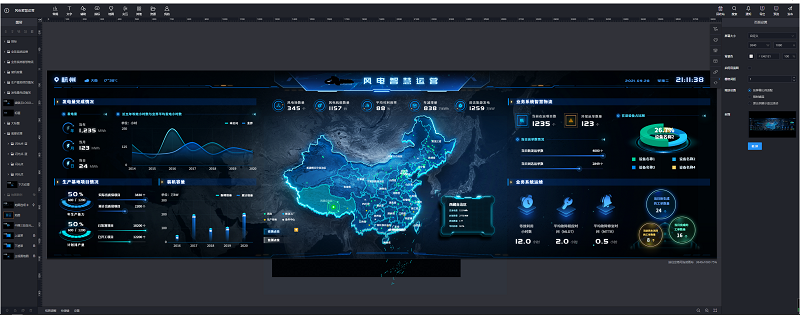
10. Supports software interface customization; the software interface and style can be customized by simple mouse dragging in the editor;
11. Supports preview signal cropping; cropped signals are automatically displayed in the preview list and can be put on screen as independent signals;
12. Supports signal grouping management and signal permission management; supports classification, grouping and sorting of signal sources, with three-level group management for all signal sources displayed in tree form, sortable by name, IP or custom criteria; the client software supports no less than 50 channels of real-time dynamic image preview.
13. Supports combined signals (e.g., 4 signals combined into one); combined signals can be moved, put on screen and saved to scenes as a whole, and can also be remotely controlled directly;
14. Supports screen display mode settings; four screen display modes can be set according to actual needs: normal, mutually exclusive, unlimited and overlay, solving problems such as excessive picture overlay, limited number of on-screen pictures, and repeated pictures on screen
15. Supports OSD rolling subtitles with font, color, size and other settings; supports HD background image; supports dual station logos with editable logo text;
16. Supports PTZ zoom in/out, left-right rotation, volume control, etc.;
17. Supports pre-operation mode; layout can be done in the virtual screen area without real-time display on the large screen. Clicking the push button puts the adjusted layout on screen with one key, preventing misoperation.
18. Web page setting; web pages can be bound in the software, and users log into the web page only in the software to query information
19. Supports audio visualization management; the output volume of nodes can be controlled with sliders, and a specific audio channel can be controlled individually; supports audio energy bar display, showing the audio status of nodes with animation effects;
20. Supports the environment control module; lights, curtains and other environment devices can be controlled directly via RS232/RS485 serial ports without central control equipment
21. Supports multi-language display including Chinese and English.
2. Large-screen windowing supports regular windowing such as 2x2 and 3x3, as well as irregular windowing by freely splitting window layouts via manual dragging;
3. Supports real-time preview of virtual screen and large screen; standard definition, high definition and ultra definition can be selected according to actual needs for convenient viewing of preview pictures;
4. Supports unlimited real-time saving and recalling of plans and scheduled polling at any set time; different scene switching effects and scene names can be defined, with short scene switching response time, ultra-low latency, extremely smooth pictures and instant window operation response; the plan can also be called to screen by voice on Huawei tablets without any device or plugin.
5. Supports LED, DID, LCD and DLP splicing, roaming, dragging, custom splitting and multi-layer overlay display; a single screen supports 16 channels of video display and overlay simultaneously; standard resolution output for seamless splicing;
6. Supports video transmission via RTSP and RTMP protocols and proprietary protocols; audio AAC, G.711, G.726; supports audio/video synchronization and asynchronous switching; supports up to 16 channels of audio mixing playback.
7. Supports H.264 and H.265 IPC-encoded cameras; IPC network camera signals can be connected and output directly to the large screen without a third-party transcoding server;
8. Supports multi-platform real-time preview operations, real-time synchronized operations on different terminals; the operation software can run on PC and mobile terminals (IOS, Android) with different resolutions (analog/SD/HD); configurations under multiple platforms automatically synchronize status without depending on servers;
9. Supports remote computer desktop control on the tablet side, remote power on/off, with network isolation between the pad and the remote computer;
10. Supports software interface customization; the software interface and style can be customized by simple mouse dragging in the editor;
11. Supports preview signal cropping; cropped signals are automatically displayed in the preview list and can be put on screen as independent signals;
12. Supports signal grouping management and signal permission management; supports classification, grouping and sorting of signal sources, with three-level group management for all signal sources displayed in tree form, sortable by name, IP or custom criteria; the client software supports no less than 50 channels of real-time dynamic image preview.
13. Supports combined signals (e.g., 4 signals combined into one); combined signals can be moved, put on screen and saved to scenes as a whole, and can also be remotely controlled directly;
14. Supports screen display mode settings; four screen display modes can be set according to actual needs: normal, mutually exclusive, unlimited and overlay, solving problems such as excessive picture overlay, limited number of on-screen pictures, and repeated pictures on screen
15. Supports OSD rolling subtitles with font, color, size and other settings; supports HD background image; supports dual station logos with editable logo text;
16. Supports PTZ zoom in/out, left-right rotation, volume control, etc.;
17. Supports pre-operation mode; layout can be done in the virtual screen area without real-time display on the large screen. Clicking the push button puts the adjusted layout on screen with one key, preventing misoperation.
18. Web page setting; web pages can be bound in the software, and users log into the web page only in the software to query information
19. Supports audio visualization management; the output volume of nodes can be controlled with sliders, and a specific audio channel can be controlled individually; supports audio energy bar display, showing the audio status of nodes with animation effects;
20. Supports the environment control module; lights, curtains and other environment devices can be controlled directly via RS232/RS485 serial ports without central control equipment
21. Supports multi-language display including Chinese and English.
Prev:nothing…
Next:nothing…