Meeting Room Management System
- characteristics
- parameters
- download
The meeting room management system includes a cloud-based meeting room management system and a private meeting room management system;
Can integrate with company OA, paperless meetings, visitors, video conferences, etc.;
Can integrate with outlook, WeCom, DingTalk, WeChat mini program, gmail platforms;
Meeting duration information can be counted, with integrated charging function, and WeChat Pay can be used.
1. The meeting reservation system adopts B/S architecture, supporting PC web booking, mobile booking and WeChat booking.
2. Supports integration development with third-party platforms such as OA, OUTLOOK, ERP and access control systems.
3. Meeting room reservation function
Supports quick reservation function; users can freely select a meeting room and set meeting subject, meeting time, host, participants and external personnel, etc.;
Supports statistical query function, displaying all meeting reservation information by default, with time period and keyword query settings;
Supports SMS and email notifications of meeting reservations, including meeting time, subject, meeting room name and check-in code.
3. Meeting calendar function
Supports viewing meeting calendar lists, meetings I attend and meetings I created; can filter ongoing, not started and ended, and view specific check-in details.
4. Meeting review function
Supports pending review meeting list; administrators can view meeting pending-review lists submitted by ordinary users and decide whether to approve;
Supports approved list; administrators can view details of approved meetings;
Supports rejected list; administrators can view details of rejected meetings.
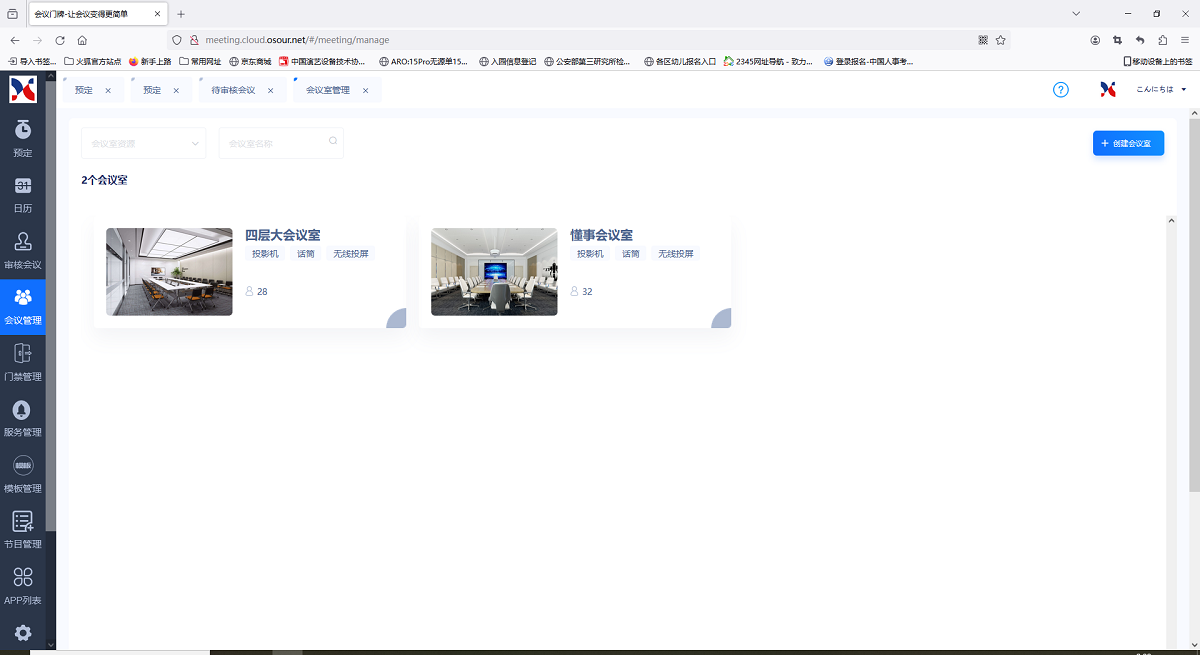
5. Meeting room management function
Supports meeting room list management; when creating a meeting room, users can select the affiliated company and department, and customize meeting room name, address, capacity, area, resource configuration and meeting room status. Supports editing, deleting and obtaining the meeting screen display address;
Supports resource list management, with add, delete, modify and query of meeting room resources.
6. System management function
Supports user password modification;
Supports viewing and modifying my account information;
Supports style management; styles can be viewed via thumbnails, each style corresponds to a resolution; supports modifying styles, and supports two style templates: no meeting and with meeting;
Supports logo settings; users can freely change the home page logo.
7. User management function
Supports company list function; when creating a company, users can configure the mail server, port, email account and password, and SMS server id;
Supports department list function; when creating a department, users can select the affiliated company and customize the department name;
Supports user list function with batch import/export of user lists; when creating a user, users can configure name, account, password, affiliated company, affiliated department, mobile phone, email, user type and user status.
8. QR code check-in function
Supports obtaining check-in codes via SMS and email, and check-in by scanning QR code on the meeting screen. Supports querying check-in details in the today meeting list.
9. Meeting screen function
Supports configuring the meeting reservation system server and port on the meeting screen;
Supports automatically generating the meeting overview screen page with scrolling refresh;
Supports eye-catching color prompts and graphic warm prompts when there is no meeting or a meeting.
2. Supports integration development with third-party platforms such as OA, OUTLOOK, ERP and access control systems.
3. Meeting room reservation function
Supports quick reservation function; users can freely select a meeting room and set meeting subject, meeting time, host, participants and external personnel, etc.;
Supports statistical query function, displaying all meeting reservation information by default, with time period and keyword query settings;
Supports SMS and email notifications of meeting reservations, including meeting time, subject, meeting room name and check-in code.
3. Meeting calendar function
Supports viewing meeting calendar lists, meetings I attend and meetings I created; can filter ongoing, not started and ended, and view specific check-in details.
4. Meeting review function
Supports pending review meeting list; administrators can view meeting pending-review lists submitted by ordinary users and decide whether to approve;
Supports approved list; administrators can view details of approved meetings;
Supports rejected list; administrators can view details of rejected meetings.
5. Meeting room management function
Supports meeting room list management; when creating a meeting room, users can select the affiliated company and department, and customize meeting room name, address, capacity, area, resource configuration and meeting room status. Supports editing, deleting and obtaining the meeting screen display address;
Supports resource list management, with add, delete, modify and query of meeting room resources.
6. System management function
Supports user password modification;
Supports viewing and modifying my account information;
Supports style management; styles can be viewed via thumbnails, each style corresponds to a resolution; supports modifying styles, and supports two style templates: no meeting and with meeting;
Supports logo settings; users can freely change the home page logo.
7. User management function
Supports company list function; when creating a company, users can configure the mail server, port, email account and password, and SMS server id;
Supports department list function; when creating a department, users can select the affiliated company and customize the department name;
Supports user list function with batch import/export of user lists; when creating a user, users can configure name, account, password, affiliated company, affiliated department, mobile phone, email, user type and user status.
8. QR code check-in function
Supports obtaining check-in codes via SMS and email, and check-in by scanning QR code on the meeting screen. Supports querying check-in details in the today meeting list.
9. Meeting screen function
Supports configuring the meeting reservation system server and port on the meeting screen;
Supports automatically generating the meeting overview screen page with scrolling refresh;
Supports eye-catching color prompts and graphic warm prompts when there is no meeting or a meeting.
Prev:nothing…
Next:nothing…